Some videos come and go — but then there are those hypnotic loops that pull you back in before your brain even notices. You watch once, twice, three times, and suddenly your screen time jumps by a full minute. That is the power of a perfectly crafted loop. And now, creators are using the same magic with lip syncing.
If you’re combining storytelling with movement, sound, and facial expression, looping becomes even more powerful. and surprisingly easy. Thanks to tools like Pippit, especially the AI video generator free feature in it, creators can take ordinary clips and turn them into endlessly repeatable, binge-worthy moments.
Today, let’s unpack the art behind those seamless lip-synced loops-why they work, how creators use them to climb the algorithm, and how you can start making your own scroll-stoppers.
The invisible doorway: How loops trick the brain into watching longer
Ever notice how your thumb hovers awkwardly after a loop restarts? That tiny pause isn’t accidental, it’s a psychological glitch.
When a loop is blended so seamlessly that the brain cannot recognize the restart, there is created this sense of incompleteness. The viewer’s subconscious goes like: let me watch one more time to understand what’s happening. Just like that, retention doubles.
Now add emotive lip syncing on top-powered through tools utilizing AI for lip-syncing-and all of a sudden, your loop isn’t just smooth visually but sticky emotionally. The character’s expression resets with perfect timing, the mouth matches the audio again, and viewers fall right back into the rhythm.
Loops work because they remove friction. Lip sync loops work because they, too, remove emotional gaps.
The circular performance: loops built for comedy, drama, and rhythm
Let’s break down how different creators turn loops into tiny repeating stories:
The comic rewind: when punchlines restart instantly
Comedy creators are in a habit of syncing their lips to a punchy phrase, meme line, or sound effect. When the loop restarts exactly at the end of the punchline, it creates this feeling that the joke hits twice. The timing becomes elastic: the more seamless the blend, the funnier it gets.
The emotional cycle: looping dramatic expressions
Loops give the audience multiple times to experience the mood for creators creating mood videos, cinematic snippets, or monologues. A subtle eyebrow raise or whispered line playing back naturally makes viewers stay longer and connect more deeply.
The rhythmic reset: music loops
Loops and music are the best of friends. Creators match lip movements to a lyric or beat drop. When the loop jumps back with no detectable cut, it feels like one endless hook — which TikTok, Reels, and Shorts all reward heavily.
In every genre, the loop isn’t just a format; it’s a performance style.
The trapdoor transition: how seamless loops boost algorithmic favor
If someone watches your video a second time, most platforms will count that towards extended watch time, which is one of the strongest signals to boost reach.
A seamless lip-synced loop often:
-
Increases replays
-
Amplifies retention
-
Triggers the algorithm to push the video
-
Turns a single view into multiple engagements.
Creators who master loops tend to see more of their videos on For You Pages because the format allows passive re-watches.
And when you put expressive lip syncing together with smart audio, a balance of novelty and comfort-what social platforms love-is reached.
The looping illusion workshop: How creators build perfect lip sync loops
You might think these loops are a result of heavy editing, expensive software, or Hollywood-grade timing. But smart creators follow a simple structure that works across niches.
Onset and rhyme with the same phrase
The last frame of your clip should be the same as the first frame. Same face angle, same mouth shape, same energy. This is the basis for the illusion.
Choose audio that resets cleanly
Some audio is naturally loopable: meme audios, bite-size reactions, quick lyrical hooks, and dramatic whispers.
Employ aids that assist in synchronizing expressions.
The mouth movements need to restart perfectly. When creators use tools supported by AI lip sync, resets are smoother because you aren’t wrestling with frame-by-frame corrections.
The Opening Ritual – Crafting Your lip sync videos with Pippit
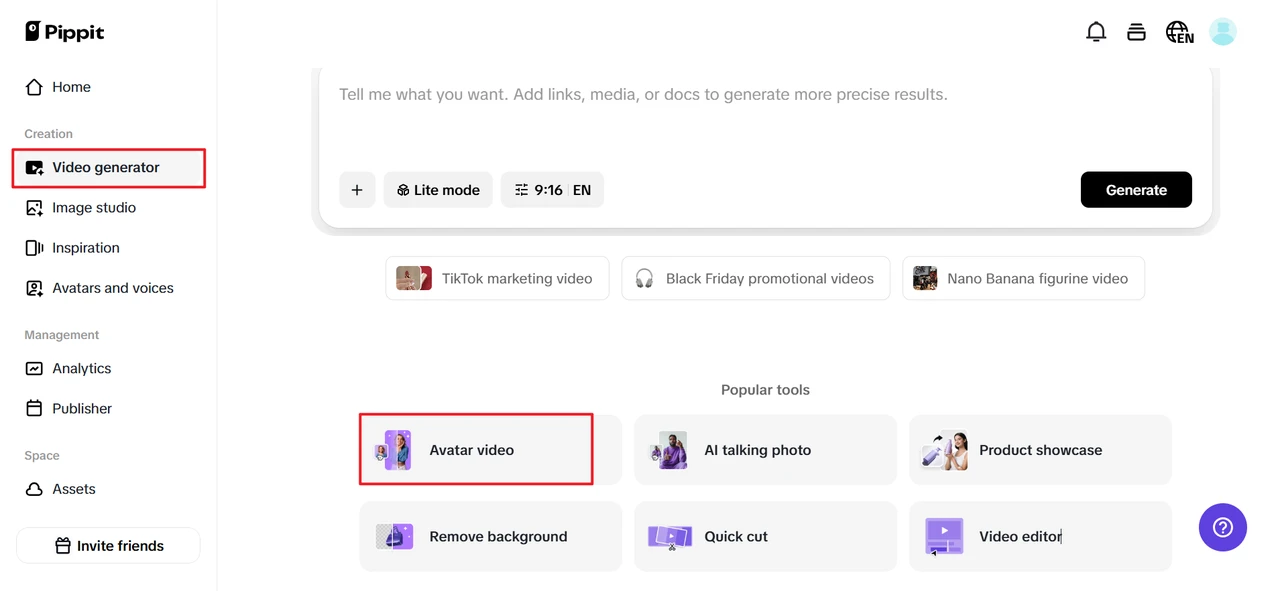
Step 1: Open the video generator and choose avatars
Once you are logged into Pippit, go ahead and click on Video generator, which is on the left-hand menu. Under popular tools, select avatars to choose or create AI avatars for your videos to help in smoothly syncing voiceovers with avatars for dynamic and engaging content.
Step 2: Choose an avatar, then edit the script
After accessing the avatar tools, select your preferred avatar from the Recommended avatars section. You can filter avatars based on gender, age, and industry, among other factors. Click on Edit script to add the custom dialogues for your video. You can input text in multiple languages, and the avatar will lip-sync it perfectly. To add more to your video, scroll down to Change caption style and choose between different caption designs that fit the theme of your video and will make it even more engaging.
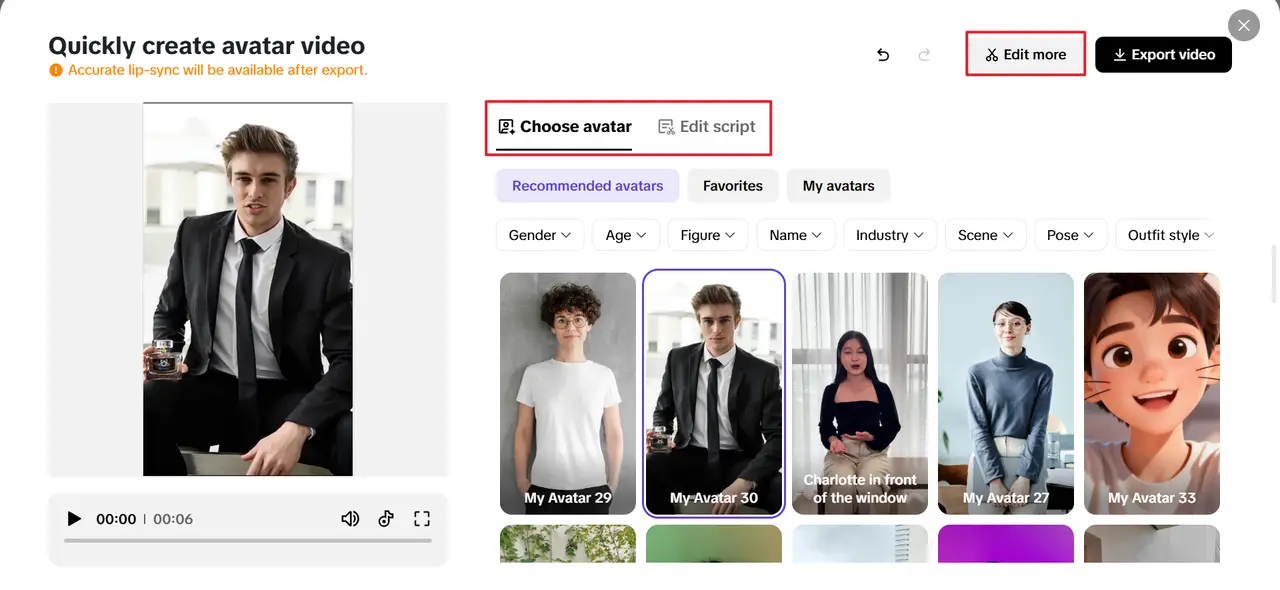
Step 3: Save & share your video
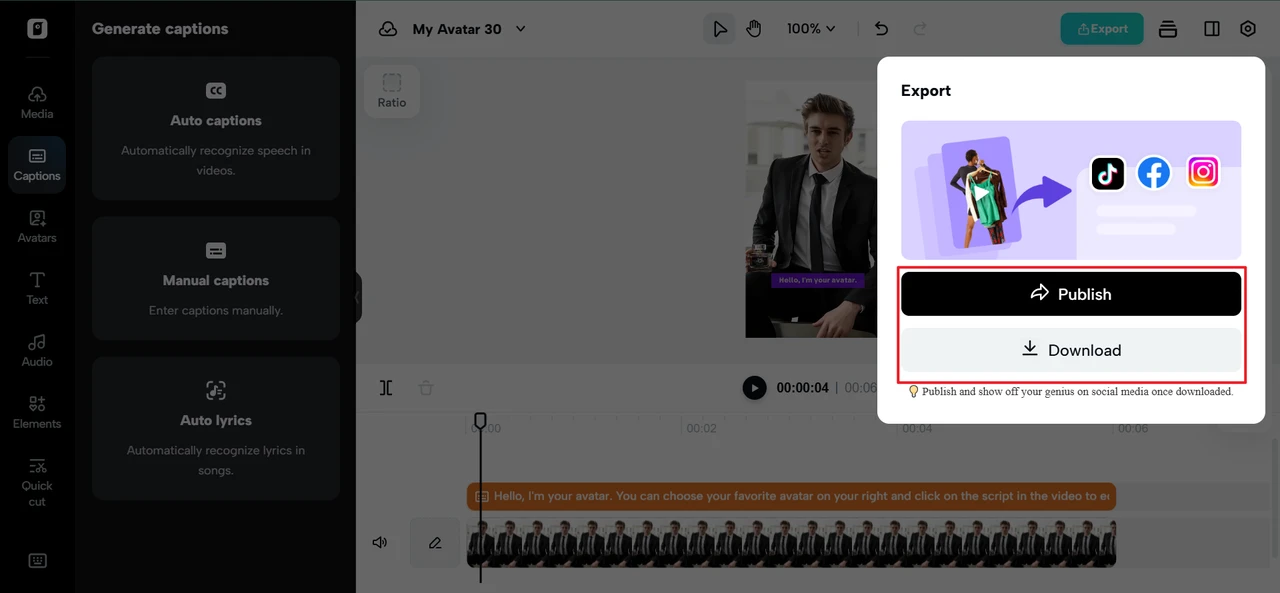
After applying the lip sync, click Edit more and start refining your video. In the Video Editor section, you can adjust the script, times of voices, or facial expressions that might not fit perfectly. You can also add text overlays and background music to enhance the final output. You can then click Export and download it in any selected format when satisfied with the video. If you want to share directly, use the Publisher feature: post to TikTok, Instagram, or Facebook, or schedule your content.
The looping spark: creative loop ideas for different niches
Here are some crowd-pleaser loop formats:
The blink-reset loop
Start with eyes open. End with eyes open. Anything between those is infinitely repeatable.
The swivel-and-reset loop
Characters turn their head slightly and then loop back with the same angle. Works beautifully with mascots, dolls, and avatars.
The lip-pause loop
Pause mid-expression, then loop back into the same starting position. Perfect for comedic audio.
The fake-loading loop
Creators simulate the video buffering or glitching. Funny. Effective. Super loopable.
Loops grow engagement because they give viewers a reason to linger. And in turn, that lingering means the algorithm smiles upon you.
The round craft table: the making of YouTube intros
While loops rule TikTok, Reels, and Shorts, long-form creators also need powerful openings. When the intro on YouTube feels tight, clear, and energized, everything else flows seamlessly.
That’s where Pippit becomes a game-changer again. Many of those same creators, after having experimented with loops, take that energy, hop into the platform, and use its YouTube intro maker to create high-retention opening sequences. Below is the exact three-step process to make a YouTube intro inside Pippit.
The loop goes full circle: final thoughts and Pippit’s insights
The beauty of seamless lip-synced loops is that they’re tiny masterpieces: playful optical illusions that trick the eye and charm the algorithm. Paired with expressive timing, audio creativity, and a touch of digital magic, loops help creators boost retention and increase shares while continuing to entertain audiences again and again.
Whether you’re experimenting with loops for short-form or crafting polished intros for long-form, Pippit gives you the creative tools to do both, simply and beautifully.
If you are ready to build loops, intros, characters, or stories that keep people watching longer than they ever intended, start creating on Pippit today; your next viral moment is already waiting in the timeline.