We’ve all been there: waking up with a full battery, only to have it drained by the end of the day, and then searching for your charger again. This is probably because of the deterioration of your phone’s battery. To mitigate this, mobile phone companies offer battery optimization. But what does optimized battery charging mean? How does battery optomization work and why is it important? This is what we will discuss in our blog today.
What Does Optimized Battery Charging Mean in Simple Terms?
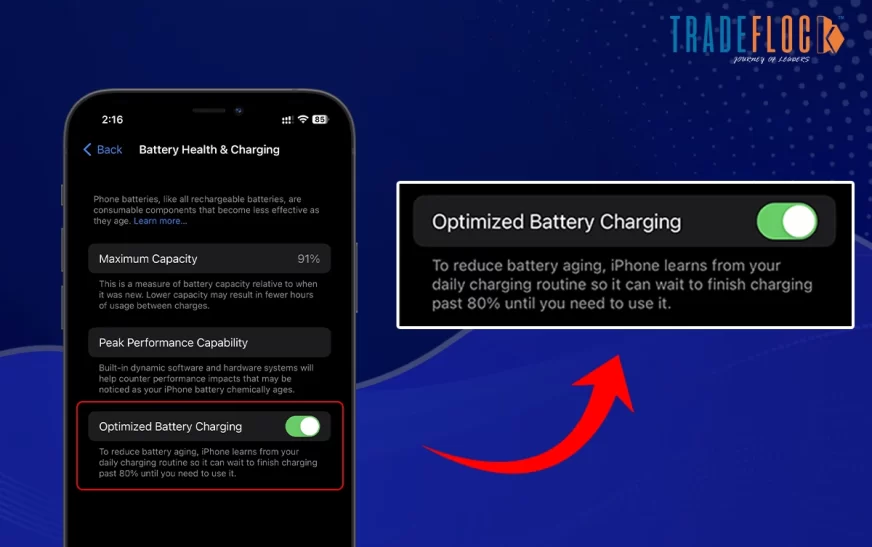
If you are wondering what does optimized battery charging means in day-to-day use, it is a feature that teaches your phone how to charge itself. Instead of pushing the battery to 100 percent as quickly as possible, your device learns your habits and delays charging fully until you actually need it. For example, if you plug in your phone overnight, it will charge up to 80 percent quickly and then hold off, completing the last 20 percent closer to the time you usually wake up.
This small shift has a huge impact because keeping lithium-ion batteries at 100 percent for long hours accelerates wear and tear. Optimized charging ensures your phone is ready for you without stressing the battery unnecessarily.
Why Optimized Battery Charging Matters
The real answer to what does optimized battery charging means is not just about fancy software, but about battery science. Lithium-ion batteries degrade faster when they stay fully charged for long periods. They also do not like extreme heat. By managing charging intelligently, phones keep batteries cooler and avoid staying at 100 percent for unnecessary hours. Over time, this helps reduce battery aging, giving you more consistent performance even after a couple of years of use.
For heavy users, this is a lifesaver. Imagine your phone running at 85 percent capacity after just a year, compared to still holding above 90 percent with optimized charging enabled. That difference can mean hours of extra screen time.
Should I Turn Off optimized Battery Charging?
Many users ask, “Should I turn it off?” Well, the answer depends on what you want to do with your phone in the long term. Here are a few reasons why you should and shouldn’t keep it turned on:
Reasons You Should Keep It On:
- It reduces the wear and tear on the battery and extends the battery’s lifespan.
- It doesn’t interfere with any of your tasks as it keeps running in the background.
- By tweaking the charging patterns, it can significantly reduce the temperature during charging.
Reason Why You Should Keep it Turned Off:
- If your charging routine is inconsistent, it can significantly affect your screen time
- Some users have reported in the past that their battery drains a little faster when this feature is turned on.
- As it delays your phone from charging upto 100%, posing significant difficulties if you need a full charge immediately.
Here are some of the main reasons for switching the feature off or on, based on your daily needs.
How to Turn Off Battery Optimization?
Now that you know what does optimized battery charging means, you should also know how it is turned off if you’re not a fan of the feature.
- Open the Settings app on your phone
- Scroll down to the Battery setting and tap on it.
- Select the option, “Battery Health & Charging
- Locate Optimized Battery Charging and toggle it On or Off.
- If turning it off, choose either
You Might Also Like: How to Turn Off Autocorrect in iPhone with Easy Steps
The Future of Battery Optimization
Looking ahead, the conversation about what does optimized battery charging means will continue to evolve. As smartphone makers explore new battery chemistries and AI-driven features, we may see even smarter systems that adapt to not just your habits, but also your environment, charging cable type, and even your app usage.
For now, optimized battery charging remains one of the most effective ways to slow down battery aging without changing how you use your phone. It is a reminder that sometimes, small tweaks in technology can make a big difference in the long run.
Conserving Your Battery For a Long Time!
So, what does optimized battery charging mean in the bigger picture? It is about giving your phone’s battery a longer, healthier life. Whether you are an iPhone loyalist or an Android fan, the principle remains the same: let your device charge smarter, not harder. By simply enabling this feature, you can stretch your battery’s lifespan, avoid the pain of early replacements, and enjoy a phone that stays reliable year after year.
Next time someone asks you, “What does optimized battery charging mean?” you can tell them it is not just a setting in your phone—it is the science of keeping your battery young.